Check a hard drive's health through a USB dock.
Every hard drive keeps a health report on itself: hours used, bad spots, temperature. A Mac can't read that report when the drive sits in a USB dock or enclosure, and the apps that can ask you to lower the Mac's security first. usbsmart reads it with the Mac's security left alone.
Free and open source (MIT license). It only reads the report. It cannot erase or change a drive.
$ usbsmart disk9

Device Model:     WDC WD5000AACS-00ZUB0
User Capacity:    500,107,862,016 bytes [500.11 GB]
SMART support:    Available, enabled

SMART overall-health: PASSED

ID# ATTRIBUTE_NAME          FLAG     VALUE WORST THRESH TYPE      UPDATED  WHEN_FAILED RAW_VALUE
  5 Reallocated_Sector_Ct   0x0033   200   200   140    Pre-fail  Always       -       0
  9 Power_On_Hours          0x0032   001   001   000    Old_age   Always       -       87079
 12 Power_Cycle_Count       0x0032   098   098   000    Old_age   Always       -       2264
194 Temperature_Celsius     0x0022   122   075   000    Old_age   Always       -       25
197 Current_Pending_Sector  0x0012   200   200   000    Old_age   Always       -       0
198 Offline_Uncorrectable   0x0010   200   200   000    Old_age   Offline      -       0
199 UDMA_CRC_Error_Count    0x003e   200   200   000    Old_age   Always       -       0
A 500 GB WD drive in the dock after 87,079 hours switched on, almost 10 years. Trimmed to seven of its 17 rows.
The numbers that say whether to trust a drive.
The full table has up to 30 rows. These are the ones to read first. Under the table, the tool lists any number that looks wrong and says in plain words what it means.
PASSED or FAILED, judged against the limits the drive's maker set for each number.
A number at or past its limit is marked FAILING_NOW. Copy the data off that drive before doing anything else with it.
Worn-out parts of the disk
Spots that stopped holding data and were swapped for spares, and spots waiting to be swapped. Both should read 0. A count that keeps climbing means the drive is on its way out.
How much life it has had
Hours switched on and the number of times it has been powered up. The drive above shows 87,079 hours and 2,264 power-ups.
Temperature
In Celsius, right now. Some drives also report the hottest and coldest they have been.
Garbled transfers
A count of data that arrived damaged between the drive and whatever it was plugged into. Above 0 usually points at a cable or connector, with the drive itself fine.
One layer of the disk stack is replaced.
USBSmartDevice subclasses IOUserSCSIPeripheralDeviceType00 from SCSIPeripheralsDriverKit. Its kernel half is Apple's own disk driver, so reads and writes never pass through this project's code. The subclass adds UserSendCDB, which carries ATA PASS-THROUGH (16) to the bridge.
IOUSBHostInterface                    the dock's USB interface
  IOUSBMassStorageDriver              Apple's USB mass-storage driver, unchanged
    IOSCSIPeripheralDeviceNub         one SCSI logical unit
      USBSmartDevice                  in place of Apple's IOSCSIPeripheralDeviceType00
        IOBlockStorageServices
          IOMedia                     disk9
Outranking Apple's driver
Both personalities match Peripheral Device Type 0. The SCSI family adds a personality's IOProbeScore to its own ranking (clamped below 5000), so 1000 outranks Apple's personality, which has none.
Exact bridge matches
bridges.json generates 91 exact USB vendor/product matches, each restricted through IOParentMatch -> IOPropertyMatch. The same SAT command code serves all of them. There is no wildcard match for every USB disk.
Signed clients
Apple granted DriverKit and the SCSI controller family for distribution. The signed app and CLI use driverkit.userclient-access to connect; the public driver does not claim allow-any-userclient-access. No USB transport entitlement, because the driver never opens the USB interface.
A zero in Apple's helper
SMART_Get_Identify_Data on DriverKit 27.0 was building 85 08 0e 00 00 00 00 … ec 00: ATA sector count 0, while t_length says the count field holds the transfer length. The driver sets the count to 1, the form smartmontools sends, before the command goes out.
smartctl, fed a recording
smartctl can replay a recorded session: given - as the device, it reads smartctl -r ataioctl,2 debug text on standard input and decodes it as if it had talked to the drive. usbsmart --smartctl writes the pages it read in that format and pipes them in.
Decoder check
tests/decoder.sh builds a made-up set of pages with valid checksums, decodes them and diffs the result against tests/expected.txt. It runs in CI after the unsigned build.
Six commands. Five read, one runs a self-test.
Each command is built by Apple's helpers, then checked byte by byte against this list before it is sent (IsAllowedCDB in Driver/USBSmartDevice.cpp). A command that fails the check comes back to the tool unsent, with its 16 bytes. The drives this was written for may hold the only copy of someone's data.
- 01IDENTIFY DEVICE
ECh. Model, serial, firmware, capacity, sector sizes. 512 bytes in. - 02SMART READ DATA
B0h / D0h. Up to 30 attributes of 12 bytes each. 512 bytes in. - 03SMART READ THRESHOLDS
B0h / D1h. The failure threshold for each attribute. 512 bytes in. - 04SMART READ LOG
B0h / D5h. One sector of one log: directory, error log, self-test log. - 05SMART RETURN STATUS
B0h / DAh. No data, the answer comes back in the LBA registers. - 06SMART EXECUTE OFF-LINE IMMEDIATE
B0h / D4h. Starts or stops the drive's own short, extended or conveyance self-test, in the background. No data, only when you ask (--selftest). The drive reads its own surface; nothing is written to your files.
macOS itself still mounts any volume it recognises on the disk, read-write, as it does without the driver.
One dock tested so far.
Tested on a MacBook Pro (M2 Max) running macOS 27.2.1, with a Sabrent USB 3 dock holding a 500 GB WD drive and then an 8 TB Seagate.
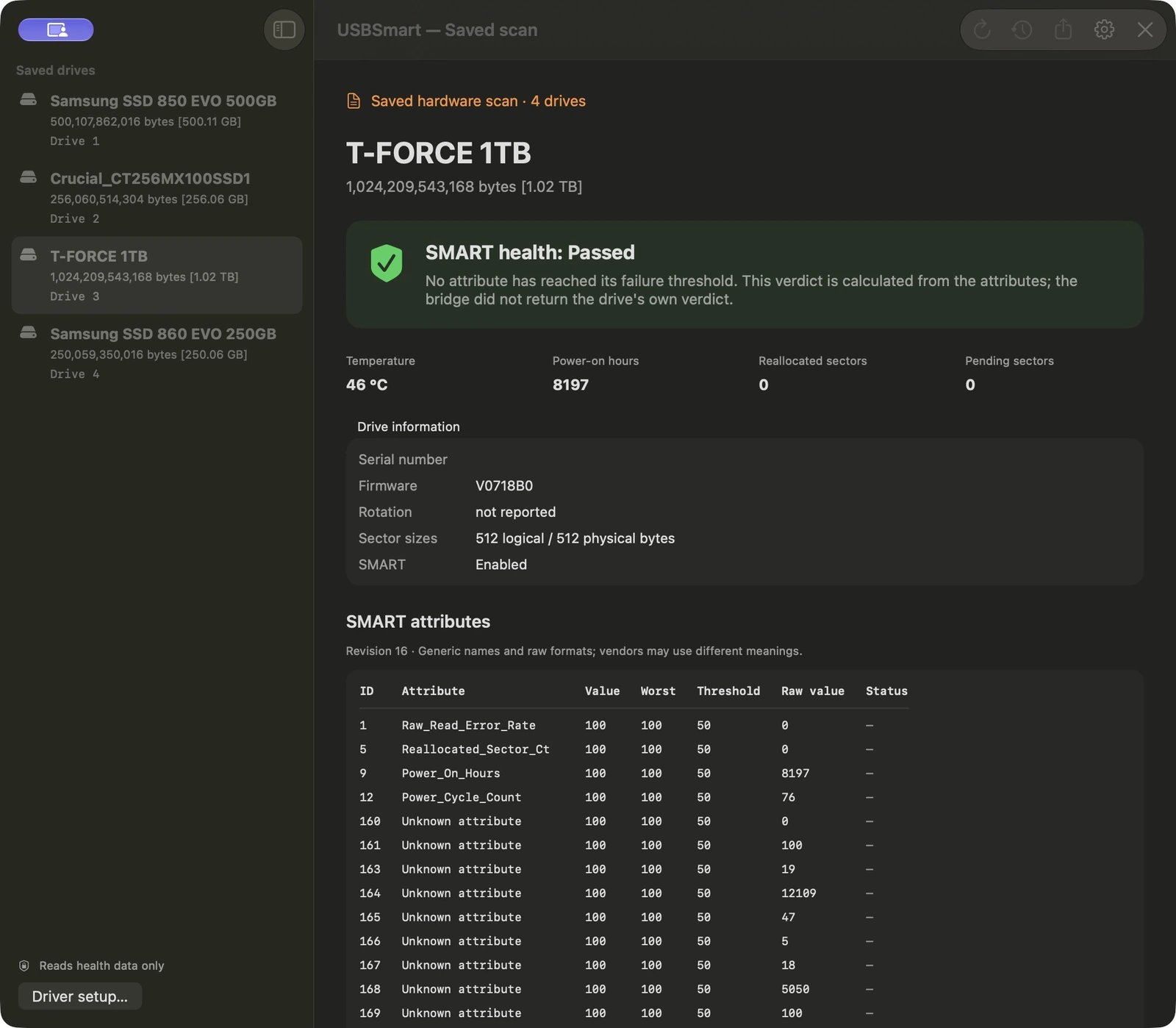
Connect a drive and open USBSmart. Select it in the sidebar to read its health report.
The app shows the drive model, capacity, temperature and SMART attributes. Click Refresh to read again. The command-line tool is also included.
The full report
Add --smartctl and the free smartctl tool decodes the same data with its database of drive models, including the drive's own error log.
The verdict is worked out
This dock does not pass along the drive's own one-word verdict, so PASSED or FAILED comes from comparing each number with its limit. smartctl does the same in that case.
Other docks
SMART reads work on the VIA Labs VL715 and all four bays of a Sabrent dock with the JMicron JMS561. Driver Setup lists 89 other bridge IDs to try.
What it can't read
NVMe SSDs (the stick-shaped kind) keep a different report. Intel Macs are out: the driver is built for Apple silicon only.
Your Mac's settings stay as they are
No kernel extension and no Reduced Security, and System Integrity Protection stays on. You approve the driver once in System Settings, with the same switch any driver uses. The drive still shows up in Finder and Disk Utility as before.
Download USBSmart 0.5.1
Check drive health from the menu bar, even with the main window closed. Open the app to compare scans, browse earlier reports, or export them as JSON. The download is signed with Developer ID and notarized by Apple. You can install it without a developer account or Xcode.
- 01An Apple silicon MacRequires macOS 14 or later.
- 02A hard drive in a supported USB dockDriver Setup shows the tested docks and other candidates.
- 03The app in ApplicationsDrag USBSmart into Applications and open it. Its driver is included.
- 04One approval in System SettingsActivate the driver in the app, then approve USBSmart under Driver Extensions. Eject any mounted volumes before reconnecting the dock.